
Not all devs on a team are strong on FHIR. That’s the reality. As such, any ad hoc or casual approach to extension creation can lead to problems and is almost always a mistake.
You should endeavor to wrap a process around this on your team if you haven’t done so already.
There are five questions I ask when I’m approached about creating a new extension.
1. Are you sure you need an extension?
Maybe your use case is already handled by resources or elements you’re unfamiliar with.
2. Does an extension already exist that meets the requirements?
An official extension, an unofficial extension, or a full-on Implementation Guide.
3. Is the use case for the extension likely to expand over time?
This often determines the structure of the extension.
4. Is there a need to run search queries on the extension values?
Custom search parameters might need to be created.
5. Will the contents of the extension need to be validated?
If so, we need to create matching profiles.
Let’s expand on these.
Do you really need the Extension?
Not every dev who works with FHIR is an expert on FHIR. They may be familiar with the resources and elements they currently use, but know little beyond that.
This is common on large projects where FHIR is only one of many component parts.
Example: A team of developers is working on an AI that uses the Device resource. They’ve become familiar with Device and use it heavily. Their data model and use case expands beyond what can fit into the Device resource and they consider an extension.
It turns out the extension is not required as the use case maps almost perfectly to the DeviceDefinition resource.
So ask yourself this: What is the purpose of the extension and is that purpose already met — fully or in part — by existing elements or resources.
If so, you don’t need a new extension.
Does a suitable Extension already exist?
Once you’ve decided that an extension is required, refer first to the FHIR documentation and see if a matching official extension exists.
You’ll find these on the “Profiles & Extensions” tab of each resource’s page.
Take Patient as an example. A number of extensions such as patient-birthTime, patient-genderIdentity and patient-disability already exist. These can be used out-of-the-box.
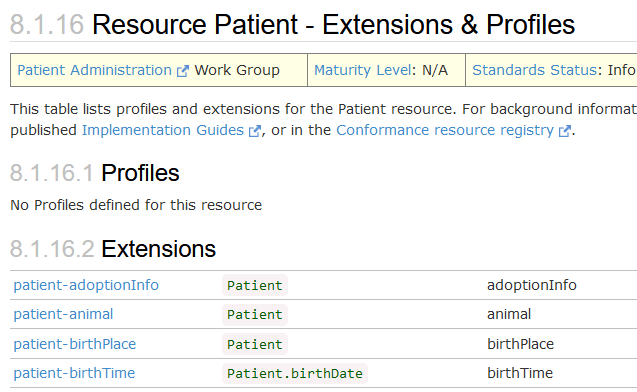
Official Patient Extensions: http://hl7.org/fhir/R4/patient-profiles.html
If an official extension does not exist, look for either an unofficial extension or an Implementation Guide that contains one. There are two approaches you should take here.
Sign up for a free account at Simplifier.net and perform a search for what you’re looking for. Here’s an example of a Patient Age extension I found after typing in “Patient Age”

I’m not advocating using this extension, but it’s a good illustration of what you can find on Simplifier.
If your search doesn’t turn up any promising results, post a question to the Implementers channel on the FHIR chat board: https://chat.fhir.org/
You’re almost certain to get a positive response here: a suggestion for a particular extension or IG, some advice on your use case and on whether an extension is the best approach, or guidance on how best to model your extension.
The Use Case for the Extension
Let’s assume your search was not productive and that a new extension is required. How do you start?
Don’t jump straight in — look beyond today and the current use case.
Chances are your initial data requirements are small and can be satisfied by a single boolean or integer value. But what about the future?
If you don’t think ahead you may find yourself in a situation in 6 months or a year where you have to redesign your initial extension, leaving you facing a data migration problem or having to work with a collection of inter-connected single value extensions.
Neither situation is ideal.
Plan ahead. If you see a likelihood that your extension will grow in the future to encompass extra values, start with a nested extension — even if it only contains a single value. That way, expanding the extension later will not negatively impact the current use.
Next, think carefully about the data type you’re going to use, especially if you’re drawn to using a string value. Is ANY value allowed or must the value come from a pre-defined list?
If there is a pre-defined set of values, you should be thinking of using a CodeableConcept and binding it to a ValueSet. This is more complicated, but if you don’t get it right at the start you’ll pay a price later — with invalid data creeping into your FHIR server and a lot of extra work correcting your mistake.

Finally, pay attention to the extension URL.
Your project or organization should have a domain or sub-domain for Extensions, StructureDefinitions and SearchParameters. If it doesn’t, push this up the chain until you get a decision.
Ideally you need a resolvable URL before you release to production.
There are companies that provide this for you, but it’s your data and your server. Better to own it and control it where you can.
Querying against your Extension
If you’re storing important data in your new extension, chances are someone will want to run a query against it at some point.
To allow this, you will need to create one or more custom SearchParameters. A SearchParameter resource defines how the search query works and contains a single fhirPath expression that identifies the extension and the element inside the extension that should be searched on.
A nested extension with multiple values may require multiple SearchParameters. An extension value that can be composed of different data types may also require more than one SearchParameter.
Here’s a more in depth walk through on custom SearchParameters and how to create them.
The process differs depending on who provides your FHIR server.
Validating data in your Extension
Profiles and Implementation Guides are advanced features of FHIR. You may or may not have used them, but they have a number of parts to play when you create an extension.
Firstly, if you want to validate the contents of an extension, you need to create a profile for the resource that uses the extension. This involves creating at least two StructureDefinition resources — one for the extension itself, the other for the resource that contains the extension — and running them into your FHIR server.
Once these resources exist, your FHIR server should be able to validate the extension using the profile.
Secondly, if other users or apps need to understand or use your extension, you should publish the extension definition. This may be as part of a larger Implementation Guide or it may be in isolation on the resolvable URL of the extension.
This is why it’s so important to get the URL right before going to production — hard to fix later when real data is flowing through your server.
If you don’t explain the purpose of the extension and what its value means, you cannot expect it to be used properly, even within your own organization.
Some final notes about extensions
- Extensions can be composed of most FHIR data types.
- When creating a nested extension, only the root URL must be resolvable. Inner extensions can use a simple text value in place of a full URL.
- An extension can have multiple data types. For example, a simple extension can accept a string OR a DateTime. You decide.
- If you have no requirement to validate resources that use the extension, you do not need to create StructureDefinitions or Profiles that encompass the extension.
- If you’re using an official extension, a Profile is still required if you wish to validate against it.
- If your extension is for internal use only it does not need to be a part of your Implementation Guide (if you have one)
More about extensions: https://www.hl7.org/fhir/r4/extensibility.html
---
Download my “FHIR Architecture Decisions” book
FHIR Weekly
Join 1,100+ business and technical leaders.